Sponsored byMixinflow
AI Video EditingAI ProductivityApproved
Genjutsu AI Video Generator icon

Genjutsu AI Video Generator

Genjutsu AI Video Generator is an AI-powered platform designed to transform existing

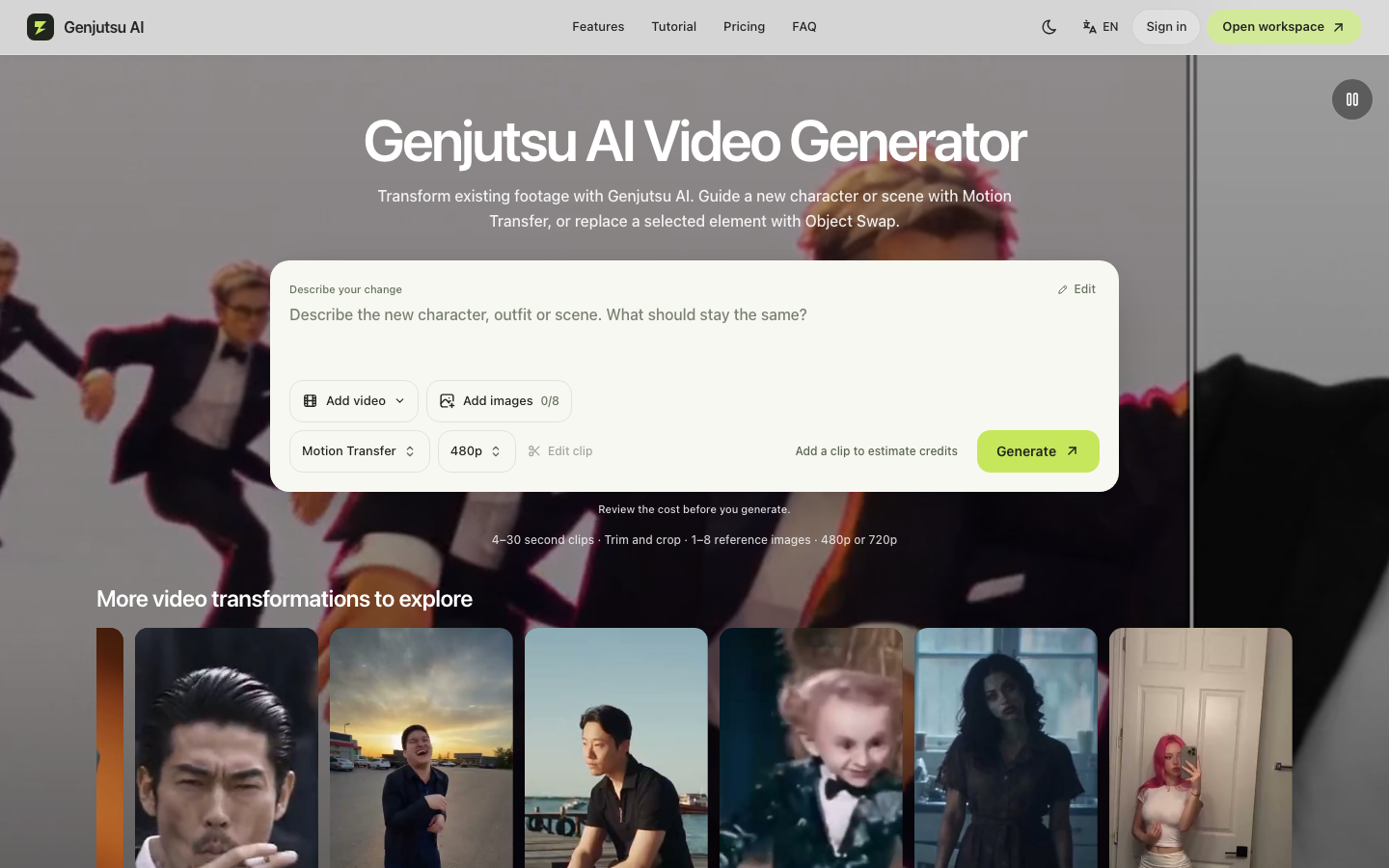
Genjutsu AI Video Generator is an AI-powered platform designed to transform existing video footage through intuitive editing tools. Users can apply Motion Transfer to guide new characters or scenes using the original clip's movement, or utilize Object Swap to replace specific elements like outfits, props, or backgrounds. The interface allows creators to upload source videos, attach up to eight reference images, and adjust clip length between four and thirty seconds. Before rendering, users can preview estimated credit costs, ensuring transparent usage. Operating on a flexible one-time credit p

Genjutsu AI Video Generator screenshot
Try Genjutsu AI Video Generator

Website: genjutsuai.io

What is Genjutsu AI Video Generator?

Genjutsu AI Video Generator is an AI-powered platform designed to transform existing video footage through intuitive editing tools. Users can apply Motion Transfer to guide new characters or scenes using the original clip's movement, or utilize Object Swap to replace specific elements like outfits, props, or backgrounds. The interface allows creators to upload source videos, attach up to eight reference images, and adjust clip length between four and thirty seconds. Before rendering, users can preview estimated credit costs, ensuring transparent usage. Operating on a flexible one-time credit p

At a Glance

Pricing
Not specified
Status
Approved
Platform
Web
Category
AI Video Editing, AI Productivity
Tags
ai-video-editor, clip-editing, credit-based, motion-transfer, object-swap, reference-images, video-generation

Why Choose Genjutsu AI Video Generator

Motion Transfer

Guides new characters or settings using the movement patterns of a source video, allowing creators to reimagine performances while preserving original timing and dynamics.

Object Swap

Enables precise replacement of selected products, props, or clothing within a frame by leveraging AI segmentation and reference imagery for seamless integration into the final output.

Credit Preview System

Calculates estimated resource consumption before generation begins, giving users full transparency over project costs and preventing unexpected deductions from their account balance. Genjutsu AI Video Generator is an AI-powered platform designed to transform existing video footage through intuitive editing tools. Users can apply Motion Transfer to guide new.

Reference Image Support

Accepts up to eight visual references to define style, appearance, or composition, ensuring generated outputs align closely with the creator’s artistic vision and brand guidelines.

Flexible Clip Editing

Supports trimming, cropping, and duration adjustments between four and thirty seconds, optimizing content for various social platforms while maintaining high-quality 480p or 720p exports.

How to Use Genjutsu AI Video Generator

  1. 1

    Upload Source Footage

    Navigate to the workspace and drag your existing video clip into the editor to establish the base timeline and movement structure.

  2. 2

    Attach Reference Images

    Upload up to eight visual guides that will instruct the AI on desired character appearances, color palettes, or environmental changes.

  3. 3

    Select Transformation Type

    Choose between Motion Transfer to adapt movement to new visuals, or Object Swap to isolate and replace specific elements within the frame.

  4. 4

    Preview and Generate

    Review the estimated credit cost displayed on the dashboard, confirm your settings, and initiate the rendering process to download the final video.

Best For

  • Social Media Content Creation

    Who: Influencers & Marketers · Quickly repurpose trending movement clips into branded content without the need for expensive reshoots or studio setups.

  • E-commerce Product Visualization

    Who: Retail Brands · Replace default mannequins or models with diverse representations using Object Swap to showcase apparel on different body types.

  • Short Film Storyboarding

    Who: Independent Filmmakers · Experiment with scene compositions and character designs rapidly using Motion Transfer to visualize narrative concepts before production.

  • Educational Animation

    Who: Teachers & Trainers · Transform static instructional videos into dynamic presentations by swapping objects or adjusting visual styles to match learning materials.

Flexible Credit-Based Pricing

Genjutsu AI eliminates recurring subscription fees by offering a straightforward credit pack model. Users purchase credits upfront and spend them only when generating videos. The preview dashboard shows exact costs per project, enabling precise budget management for individual creators or small teams without financial

Frequently Asked Questions About Genjutsu AI Video Generator

Does Genjutsu AI require a monthly subscription?

No, the platform operates on a one-time credit pack system, allowing you to purchase only the resources needed for your projects.

What video formats and resolutions are supported?

Users can export results in 480p or 720p quality, with support for standard clip durations ranging from four to thirty seconds.

How many reference images can I upload per project?

You can attach up to eight reference images to guide the AI in matching specific styles, characters, or environmental details.

Can I edit the length of my video before generation?

Yes, the built-in editor allows you to trim and crop your source footage to meet exact duration requirements prior to processing.

How does the credit preview feature work?

The system calculates the required credits based on clip length, resolution, and transformation type, displaying the exact cost before you commit to generation.

Is there a limit to how many videos I can create?

Generation limits depend entirely on your purchased credit balance, with no hard caps on total projects as long as funds remain available.