Sponsored byMixinflow
AI ProductivityAI Image EnhancementAI WritingReference & InformationApproved
Photo to Text Converter icon

Photo to Text Converter

Photo to Text Converter is a free online tool that extracts text

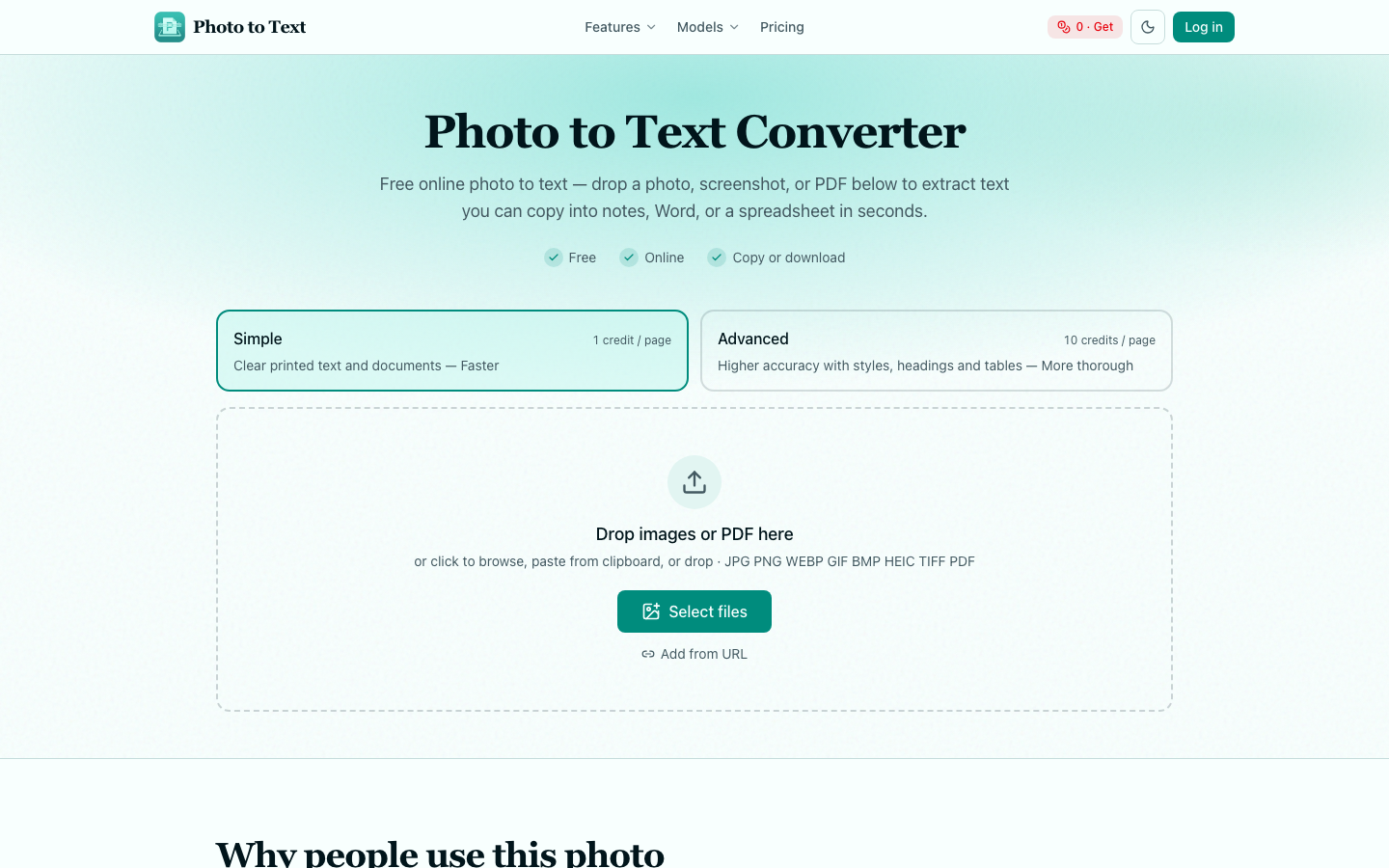
Photo to Text Converter is a free online tool that extracts text from images, PDFs, and screenshots. It allows users to quickly convert visual information into editable text that can be copied into notes, documents, or spreadsheets. Supporting various file formats like JPG, PNG, and WEBP, the service offers both a simple mode for clear text and an advanced mode for more complex images with styles, headings, and tables, ensuring accurate text extraction for diverse needs.

Photo to Text Converter screenshot
Try Photo to Text Converter

Website: photototext.ai

What is Photo to Text Converter?

Photo to Text Converter is a free online tool that extracts text from images, PDFs, and screenshots. It allows users to quickly convert visual information into editable text that can be copied into notes, documents, or spreadsheets. Supporting various file formats like JPG, PNG, and WEBP, the service offers both a simple mode for clear text and an advanced mode for more complex images with styles, headings, and tables, ensuring accurate text extraction for diverse needs.

At a Glance

Pricing
Not specified
Status
Approved
Platform
Web
Category
AI Productivity, AI Image Enhancement, AI Writing, Reference & Information
Tags
document-conversion, image-to-text, ocr, pdf-to-text, screenshot-to-text, text-extraction

Why Choose Photo to Text Converter

Free Online Conversion

Extract text from images and PDFs without cost. The Photo to Text Converter provides a free tier to get started with text extraction from various visual sources.

Multiple File Format Support

Upload and convert images in formats such as JPG, PNG, WEBP, GIF, BMP, HEIC, and TIFF, as well as PDF documents. Photo to Text Converter is a free online tool that extracts text from images, PDFs, and screenshots. It allows users to quickly convert visual information into.

Simple and Advanced Modes

Choose between a faster, simpler mode for clear text or an advanced mode for higher accuracy on images with complex layouts, styles, and tables.

Direct Copy and Download Options

Easily copy extracted text to your clipboard for use in notes or emails, or utilize dedicated converters to open JPG to Word or JPG to Excel files.

Clipboard Pasting

Paste text directly from your clipboard into the converter, streamlining the process of extracting text from copied content. Photo to Text Converter is a free online tool that extracts text from images, PDFs, and screenshots. It allows users to quickly convert visual information into.

How to Use Photo to Text Converter

  1. 1

    Upload Your File

    Drop an image file (JPG, PNG, etc.) or a PDF into the converter area, or click to browse your files. You can also paste from your clipboard or add a URL.

  2. 2

    Extract Text

    Select either the 'Simple' or 'Advanced' mode based on your image clarity and complexity, then run the OCR process to extract the text.

  3. 3

    Use Extracted Text

    Copy the resulting text to your clipboard for immediate use, or use the options to open the content directly in Word or Excel.

Best For

  • Digitizing Documents

    Who: Students and Researchers · Quickly convert scanned notes, textbook pages, or research papers into editable text for easier searching and citation.

  • Processing Receipts

    Who: Individuals and Small Businesses · Extract expense details from receipt images and easily transfer them into spreadsheets for accounting and record-keeping.

  • Extracting Information from Screenshots

    Who: Content Creators and Professionals · Convert text from screenshots of websites, articles, or social media posts into editable formats for articles, reports, or notes.

  • Converting Tables from Images

    Who: Data Analysts · Pull tabular data from images or PDFs directly into Excel, avoiding manual retyping and ensuring data integrity.

  • Creating Editable PDFs

    Who: Anyone with Image-Based PDFs · Transform image-based PDFs into text-searchable and editable documents, making them more accessible and usable.

Frequently Asked Questions About Photo to Text Converter

Is Photo to Text Converter free to use?

Yes, Photo to Text Converter offers a free online service to extract text from images and PDFs. There are also paid options for higher usage and advanced features.

What file types can I upload?

You can upload JPG, PNG, WEBP, GIF, BMP, HEIC, TIFF image files, as well as PDF documents.

Do I need to sign up to use the tool?

No, you can start extracting text from images and PDFs immediately without any sign-up requirement.

Can I extract text from screenshots?

Absolutely. Photo to Text Converter is designed to handle screenshots effectively, turning them into editable text.

What is the difference between Simple and Advanced modes?

The Simple mode is faster for clear text, while the Advanced mode uses more robust processing for higher accuracy on images with complex layouts, styles, and tables.

Can I convert images directly to Word or Excel files?

Yes, Photo to Text Converter provides options to open your extracted image content directly as Word (.docx) or Excel (.xlsx) files.

How accurate is the text extraction?

Accuracy depends on the image quality and the mode selected. The Advanced mode of Photo to Text Converter is optimized for higher accuracy, especially with challenging images.